Create a tutor class
Set up a class for the student or group, with exam and subject context kept separate from other students.
For math tutors
Gradenza gives math tutors a fast way to assign work, collect handwritten submissions, draft AI grading reports, and track mastery between lessons. Start with a small roster, review every report before sharing, and use the data to plan the next session.
Audience
This page is for independent and small-group math tutors who need structure without school LMS overhead.
IB Math AA and AI tutors assigning weekly practice.
Tutors preparing students with past-paper and mock exam cycles.
Private teachers who need parent-ready evidence of progress.
Tutors managing students across different exam tracks or class contexts.
Workflow
The workflow is designed around one-to-one and small-group tutoring, where feedback speed affects the next lesson.
Set up a class for the student or group, with exam and subject context kept separate from other students.
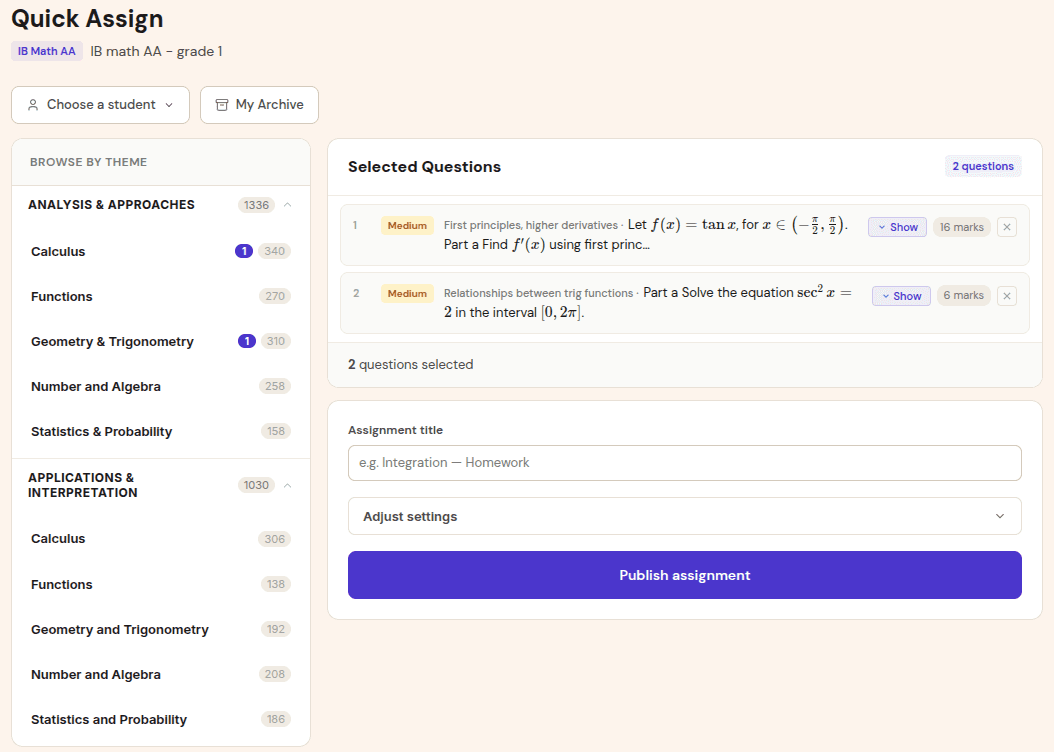
Choose a topic set, homework task, or mock paper based on the student goal.
Students upload phone photos, PDFs, or Drive files so the grading report is ready for tutor review.
Use question feedback and mastery maps to decide what to reteach, practise, or extend next.
Use cases
Tutors can use Gradenza for the work that usually happens outside paid lesson time.
Assign five exam-style questions, collect photos, and review a report before the next session.
Use mastery states and recent grading reports to explain where the student is improving or stuck.
Grade a full paper, identify topic gaps, and use the next session for targeted revision.
Benefits
Tutors need faster feedback, but they also need defensible detail that supports their lesson choices.
AI grading drafts the report so the tutor can focus review time on decisions and lesson planning.
Assignments, submissions, and reports stay organised instead of being scattered across messages.
Mastery maps turn repeated assignments into visible evidence for students and parents.
Proof and trust
Gradenza keeps the setup lightweight while preserving review and reporting controls.
Tutors can create classes and invite students directly.
Reports can be checked and adjusted before feedback is shared.
A student in two courses can have separate assignment histories and mastery maps.
Related resources
Continue into the adjacent workflow instead of treating this page as a dead end.
FAQ
Yes. Gradenza supports direct tutor classes and does not require a school account.
Yes. Students can upload handwritten work as photos, PDFs, stylus exports, or Drive files.
IB Math is the primary current grading workflow, with planned support for additional exam systems through exam-specific adapters.
Next step
Create a small tutor class, assign practice, and use the first report to decide whether the workflow fits your sessions.